2020年3月

简介

代码简单,页面简洁,支持自动连续播放,兼容微信不用全屏就能播放,第一次打开手动点击播放;
视频链接添加到ks.txt文件中,每行一条链接地址,源码包内提供了6000条视频链接,自行添加即可;

代码

index.html - 入口页面

<!DOCTYPE html>
<html lang="zh-CN">
<head>
    <meta charSet="utf-8" />
    <meta http-equiv="X-UA-Compatible" content="IE=edge,chrome=1" />
    <meta http-equiv="Cache-Control" content="no-transform" />
    <meta http-equiv="Cache-Control" content="no-siteapp" />
    <meta name="referrer" content="never">
    <meta name="renderer" content="webkit" />
    <meta name="viewport" content="width=device-width, initial-scale=1.0, maximum-scale=1.0, user-scalable=no" />
    <title> XJJ </title>
    <link rel="stylesheet" href="style.css">
</head>
<body>
    <section id="main">
        <video id="player" src="video.php" controls webkit-playsinline playsinline></video>
    </section>
    <section id="buttons">
        <button id="switch">连续: 开</button>
        <button id="next">播放下一个</button>
    </section>
    <script>
    (function (window, document) {
        if (top != self) {
            window.top.location.replace(self.location.href);
        }
        var get = function (id) {
            return document.getElementById(id);
        }
        var bind = function (element, event, callback) {
            return element.addEventListener(event, callback);
        }
        var auto = true;
        var player = get('player');
        var randomm = function () {
            player.src = 'video.php?_t=' + Math.random();
            player.play();
        }
        bind(get('next'), 'click', randomm);
        bind(player, 'error', function () {
            randomm();
        });
        bind(get('switch'), 'click', function () {
            auto = !auto;
            this.innerText = '连续: ' + (auto ? '开' : '关');
        });
        bind(player, 'ended', function () {
            if (auto) randomm();
        });
    })(window, document);
    </script>      
</body>
</html>

video.php - 随机获取视频地址

<?php

function read(...$filelist) {
    $list = [];
    foreach ($filelist as $file) {
        $handle = fopen($file, 'r');
        while (($line = fgets($handle)) !== false) {
            array_push($list, trim($line));
        }
        fclose($handle);
    }
    return $list;
}

$list = read('ks.txt');
$url = $list[array_rand($list)];

header("Location: {$url}");

style.css - 样式

* {
    border: 0;
    margin: 0;
    padding: 0;
    outline: none;
    box-sizing: border-box;
}

body {
    background: #000;
    width: 100vw;
    height: 100vh;
    overflow: hidden;
    display: flex;
    flex-direction: column;
    align-items: center;
}


#main {
    height: calc(100vh - 60px);
    display: flex;
    justify-content: center;
    align-items: center;
}

#player {
    width: 100%;
    height: auto;
    max-height: 100%;
}

#buttons {
    height: 60px;
    padding: 10px;
}

#switch,
#next {
    background: #FFF;
    background: linear-gradient(to bottom, #FF2,#FB0);
    color: #AF2E08;
    font-size: 16px;
    font-weight: bold;
    height: 40px;
    padding: 0px 20px;
    margin: 0px 5px;
    border-radius: 20px;
}

ks.txt - 视频列表

http://alimov2.a.yximgs.com/upic/2017/11/05/03/BMjAxNzExMDUwMzMyMjNfMTY5OTgwMzlfMzc2OTA5MDYwOV8xXzM=_b.mp4
http://txmov2.a.yximgs.com/upic/2019/05/18/18/BMjAxOTA1MTgxODA4MTVfMTExNTkxMjA4Ml8xMzE4MTQ2NTUwOV8xXzM=_b_B9779e00de57a95b32ce7c7f1a6f5d344.mp4
http://txmov2.a.yximgs.com/upic/2019/05/18/18/BMjAxOTA1MTgxODMxMzZfMjIyNDUxMTY2XzEzMTgyNDUzOTExXzFfMw==_b_B8d23190ec90818e7b12bfaa1062a518c.mp4
http://txmov2.a.yximgs.com/upic/2019/06/10/12/BMjAxOTA2MTAxMjExNDFfNTQwMDU2NDBfMTM5MzQyMDAxNjBfMV8z_b_B83123c2961cad47d1a7214ea2524c32d.mp4
http://hwmov.a.yximgs.com/upic/2019/07/10/21/BMjAxOTA3MTAyMTI1NTFfNDM3ODZfMTUwMjY0MzU3MzJfMV8z_b_B276364034fb4756323028e2c0bc3c3e7.mp4
……
后面自行补充

下载

可以按上面的代码自行创建文件,也可直接下载源码包
源码下载:https://www.lanzous.com/iamjp8j
预览地址:https://oem.imwgh.com/xiaoshipin
参考链接:https://www.hostloc.com/thread-662901-1-1.html
微信扫一扫体验:

微信扫一扫体验

非ROOT删除小米MIUI系统自带应用
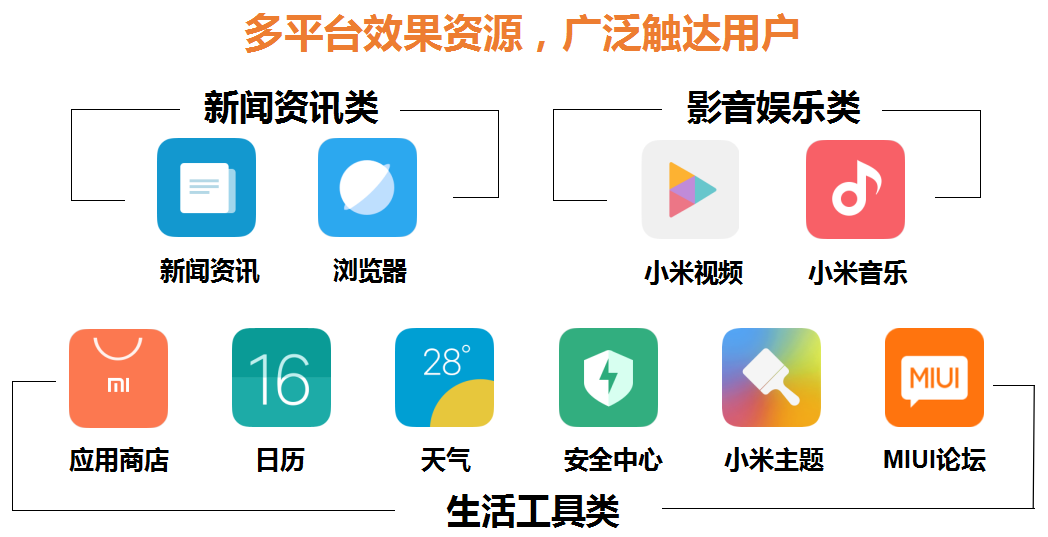
上面这张图就是小米官方的广告投放系统介绍,小米的 MIUI 系统铺天盖地的广告也一再被用户吐槽为 ADUI,想来广告现在已经成了 MIUI 系统最显著的特点了。

将 MIUI 系统 root 并且使用管理工具屏蔽广告推送,或者 root 后直接刷入干净的第三方 rom,都是一劳永逸地解决垃圾广告问题的方法,使用本文介绍的 ADB 工具屏蔽广告的效果没有前面两个好,但好在不是很麻烦,而且不用 root 系统。

方法及步骤说明如下:

1、下载 ADB 工具
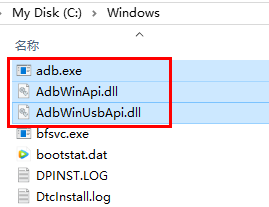
ADB 全称 Android Debug Bridge(Android 调试桥),是一个通用命令行工具,可以与模拟器实例或连接的Android 设备进行通信。查看介绍及下载可以直接前面的超链接。下载好之后把下面三个文件放到如下路径: C:\Windows
ADB工具

2、安装小米刷机工具(安装手机驱动)
小米通用刷机工具自带手机驱动,安装好驱动才能正常使用 ADB 工具。

3、开启 MIUI 开发者模式
依次打开设置-我的设备-全部参数,在「MIUI 版本」一栏连续点击多次,开启 MIUI 开发者模式。

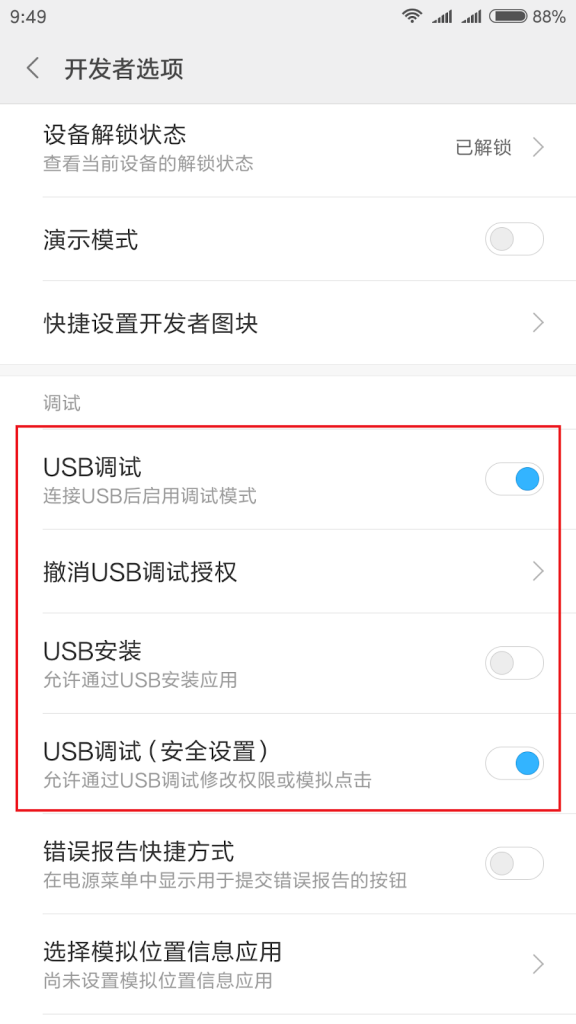
4、开启 USB 调试
依次打开设置-更多设置,进入开发者选项,再打开「USB 调试」和「USB 调试(安全设置)」两项,如下图所示:
开启 USB 调试

5、用 USB 数据线连接电脑和手机

6、使用 ADB 命令删除 MIUI 系统自带应用
删除应用的 ADB 命令是:
adb shell pm uninstall --user 0 应用包名

例如,在 MIUI 系统中「搜狗输入法」的包名为:com.sohu.inputmethod.sogou.xiaomi,那么卸载搜狗输入法的完整 ADB 命令为:
adb shell pm uninstall --user 0 com.sohu.inputmethod.sogou.xiaomi

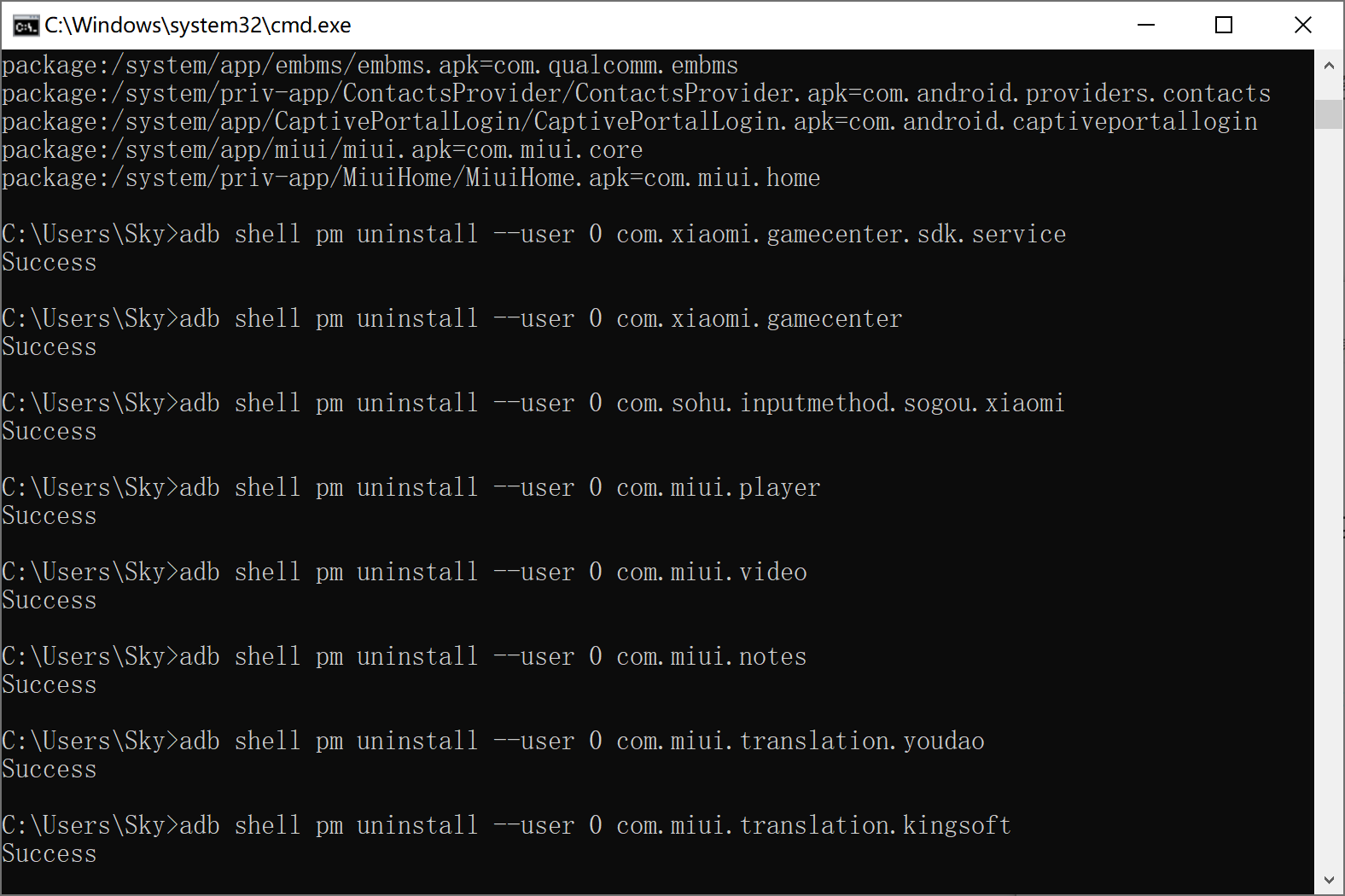
打开 Windows 系统的「命令提示符」工具(快捷键是 win + R,再输入 cmd 回车),直接输入上面的删除命令,成功之后会返回 success 提示,这种删除是实时生效的。

注意:

1)不同的 MIUI 版本可能系统应用包名会有变化,可以使用如下命令查看系统所有包名:
adb shell pm list packages
2)并不是所有的系统自带应用都可以删除,有些删除会导致手机无法开机,请谨慎操作;
3)如果你不想删除应用,可以使用如下命令冻结,效果差不多,冻结的应用可以再解冻:
adb shell pm disable --user 0 应用包名
4)删除的应用(通过 uninstall 命令)无法使用命令恢复,但是升级系统可以再次回来。
uninstall命令

下面是我将自己和家人的小米手机 MIUI 系统删除的一些系统自带应用集合,删除后重启手机没有问题,其它可删除应用请自行测试。

(MIUI 9、MIUI 10 测试删除后能正常开机使用)
adb shell pm uninstall --user 0 com.miui.systemAdSolution (小米系统广告解决方案,必删)
adb shell pm uninstall --user 0 com.miui.analytics (小米广告分析,必删)
adb shell pm uninstall --user 0 com.xiaomi.gamecenter.sdk.service (小米游戏中心服务)
adb shell pm uninstall --user 0 com.xiaomi.gamecenter (小米游戏中心)
adb shell pm uninstall --user 0 com.sohu.inputmethod.sogou.xiaomi (搜狗输入法)
adb shell pm uninstall --user 0 com.miui.player (小米音乐)
adb shell pm uninstall --user 0 com.miui.video (小米视频)
adb shell pm uninstall --user 0 com.miui.notes (小米便签)
adb shell pm uninstall --user 0 com.miui.translation.youdao (有道翻译)
adb shell pm uninstall --user 0 com.miui.translation.kingsoft (金山翻译)
adb shell pm uninstall --user 0 com.android.email (邮件)
adb shell pm uninstall --user 0 com.xiaomi.scanner (小米扫描)
adb shell pm uninstall --user 0 com.miui.hybrid (混合器)
adb shell pm uninstall --user 0 com.miui.bugreport (bug 反馈)
adb shell pm uninstall --user 0 com.milink.service (米连服务)
adb shell pm uninstall --user 0 com.android.browser (浏览器)
adb shell pm uninstall --user 0 com.miui.gallery (相册)
adb shell pm uninstall --user 0 com.miui.yellowpage (黄页)
adb shell pm uninstall --user 0 com.xiaomi.midrop (小米快传)
adb shell pm uninstall --user 0 com.miui.virtualsim (小米虚拟器)
adb shell pm uninstall --user 0 com.xiaomi.payment (小米支付)
adb shell pm uninstall --user 0 com.mipay.wallet (小米钱包)
adb shell pm uninstall --user 0 com.android.soundrecorder (录音机)
adb shell pm uninstall --user 0 com.miui.screenrecorder (屏幕录制)
adb shell pm uninstall --user 0 com.android.wallpaper (壁纸)
adb shell pm uninstall --user 0 com.miui.voiceassist (语音助手)
adb shell pm uninstall --user 0 com.miui.fm (收音机)
adb shell pm uninstall --user 0 com.miui.touchassistant (悬浮球)
adb shell pm uninstall --user 0 com.android.cellbroadcastreceiver (小米广播)
adb shell pm uninstall --user 0 com.xiaomi.mitunes (小米助手)
adb shell pm uninstall --user 0 com.xiaomi.pass (小米卡包)
adb shell pm uninstall --user 0 com.android.thememanager (个性主题管理)
adb shell pm uninstall --user 0 com.android.wallpaper (动态壁纸)
adb shell pm uninstall --user 0 com.android.wallpaper.livepicker (动态壁纸获取)
adb shell pm uninstall --user 0 com.miui.klo.bugreport (KLO bug 反馈)

前面两个是 MIUI 系统支撑广告及精准化推送的应用,应第一时间删除,删除后不会出现无法开机的情况。这样 MIUI 系统的广告就会少很多——没有验证是否完全屏蔽。

【警告】以下系统自带应用删除后必定无法正常开机(来自网络),请避免误删:

com.miui.cloudservice (小米云服务)
com.xiaomi.account (小米账户)
com.miui.cloudbackup (云备份)
com.xiaomi.market (应用市场)

前言

  • 一个简单统计网站访客的PHP源码,实现前端网页显示访问量
  • 采用PV统计方式,单个用户连续点击N篇文章,记录N次访问量
  • 源码会自动生成TXT记录文档,记录的访问量可以自行修改

预览

https://oem.imwgh.com/coffee/
https://oem.imwgh.com/jitang/

源码

在网站根目录新建一个名为FKTJ.php的文件,然后写入以下代码

<?php
$n=file_get_contents('FKTJ.txt');
$n++;
file_put_contents('FKTJ.txt',$n);
echo "document.write($n);";
?>

在需要显示的地方添加以下调用代码

你是第<script type=text/javascript src=FKTJ.php></script>位访问者

说明

加入调用代码后打开网页,会在后台生成一个名为FKTJ.txt的记录文件,编辑此文件可以实现修改访问量
如需统计次目录下的单页访问量,可以在次目录下新建FKTJ.php文件,然后添加调用代码即可

Windows

使用fsutil命令,Windows下一般都自带了这个命令,直接使用即可;
右键以管理员身份运行命令提示符
命令的格式为:fsutil file createnew 新文件名 文件大小
例:
在D盘根目录下创建一个名为imwghcom.zip的文件

1MB大小
fsutil file createnew D:\imwghcom.zip 1048576
100MB大小
fsutil file createnew D:\imwghcom.zip 104857600
1GB大小
fsutil file createnew D:\imwghcom.zip 1073741824

Linux

Linux系统下直接使用dd命令即可,一般系统都会自带,不需要额外安装;
命令的格式为:dd if=/dev/zero of=要生成的文件 bs=读入的block大小 count=读取的block个数
例:
在/home目录下创建一个后缀名为.dat的文件

100MB大小
dd if=/dev/zero of=/home/100MB.dat bs=1M count=100
1GB大小
dd if=/dev/zero of=/home/1GB.dat bs=1M count=1024
10GB大小
dd if=/dev/zero of=/home/10GB.dat bs=1M count=10240

介绍

  • 通常我们需要截图时都是使用截图工具或Windows自带的截图工具;
  • 其实Chrome浏览器已经自带了截图功能,下面让我们一起来试试吧;
  • Chrome浏览器和360极速浏览器都可以使用,其他浏览器也可以试试;

支持说明

  • 截取自选区域
  • 截取整个网页
  • 截取当前节点
  • 截取当前屏幕

截图步骤

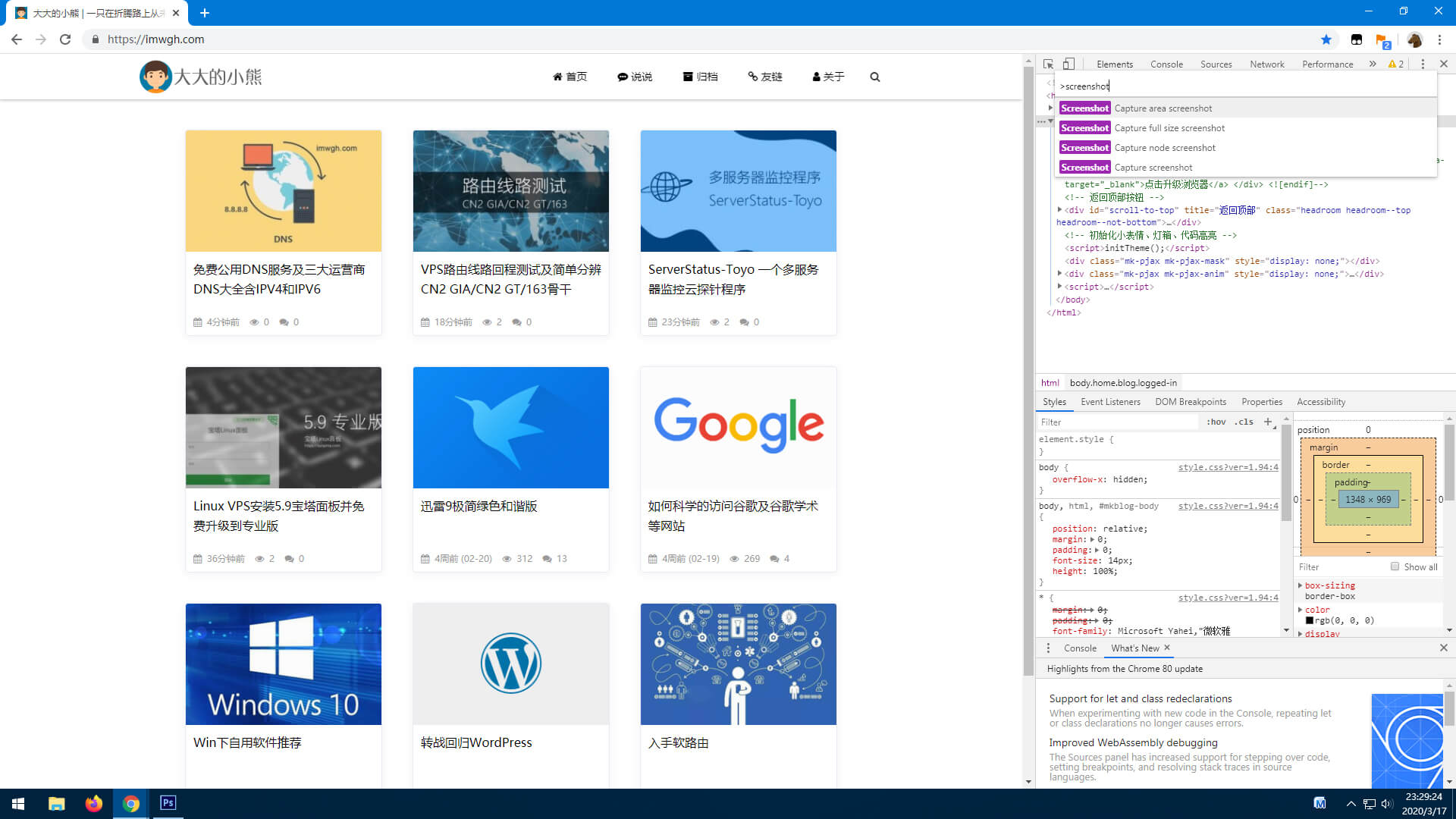
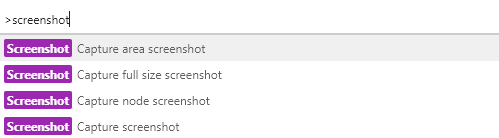
打开你需要截图的页面,然后按下键盘的F12键,再按下Ctrl+Shift+P键,在弹出的输入框中输入screenshot后回车;
截图步骤
然后会出现四个选项;
第一个:截取自选区域
第二个:截取整个网页
第三个:截取当前节点
第四个:截取当前屏幕
四个截图模式
截图完成后自动下载到下载目录,打开下载框或下载目录即可看到图片,快试试吧;